Canvas nodes
GitHub CSV
Load CSV data from a GitHub URL.
How it works
Paste the GitHub URL for a CSV and fetch it into the pipeline. The fetched rows can feed the same nodes as a local file.
Simple example
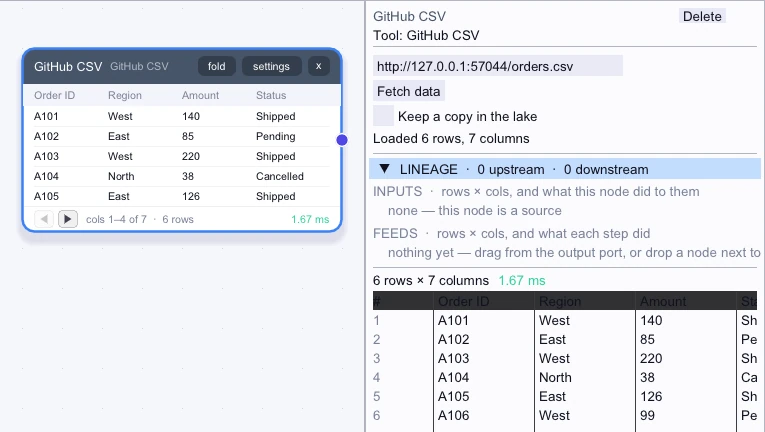
Open the node’s URL field and fetch the locally served orders CSV. The same field accepts a raw URL for a public GitHub CSV. Preview the loaded rows before wiring the source into a workflow.
Loaded rows
First 5 of 6 rows| Order ID | Region | Amount | Status | Customer ID | Reference |
|---|---|---|---|---|---|
| A101 | West | 140 | Shipped | C1 | Retail |
| A102 | East | 85 | Pending | C2 | Outlet |
| A103 | West | 220 | Shipped | C3 | Retail |
| A104 | North | 38 | Cancelled | C9 | Retail |
| A105 | East | 126 | Shipped | C2 | Outlet |
Complex workflow
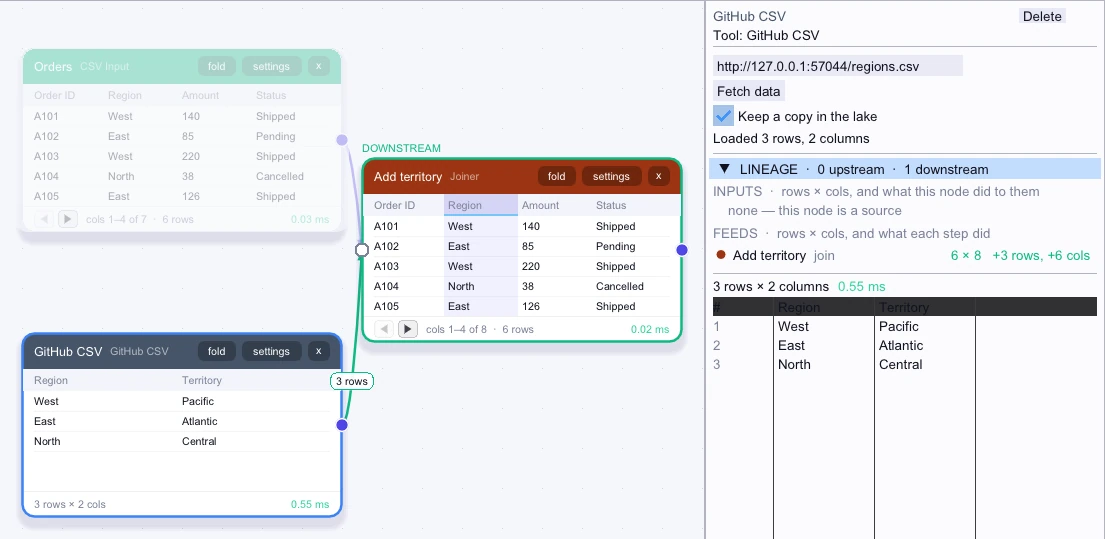
Fetch the locally served region lookup and join it to a local orders file. This example uses an HTTP fixture in place of a raw GitHub file. You can keep a copy in the lake and save the workflow to its database to reopen from the cached table.
Loaded rows
3 rows| Region | Territory |
|---|---|
| West | Pacific |
| East | Atlantic |
| North | Central |
Workflow result
First 5 of 6 rows| Order ID | Region | Amount | Status | Reference | Territory |
|---|---|---|---|---|---|
| A101 | West | 140 | Shipped | Retail | Pacific |
| A102 | East | 85 | Pending | Outlet | Atlantic |
| A103 | West | 220 | Shipped | Retail | Pacific |
| A104 | North | 38 | Cancelled | Retail | Central |
| A105 | East | 126 | Shipped | Outlet | Atlantic |