Canvas nodes
Duplicate Columns
Remove columns whose normalized headers repeat an earlier header.
How it works
Remove a later column when its header repeats an earlier one after case, spaces, and punctuation are ignored. The first matching header keeps its values.
Simple example
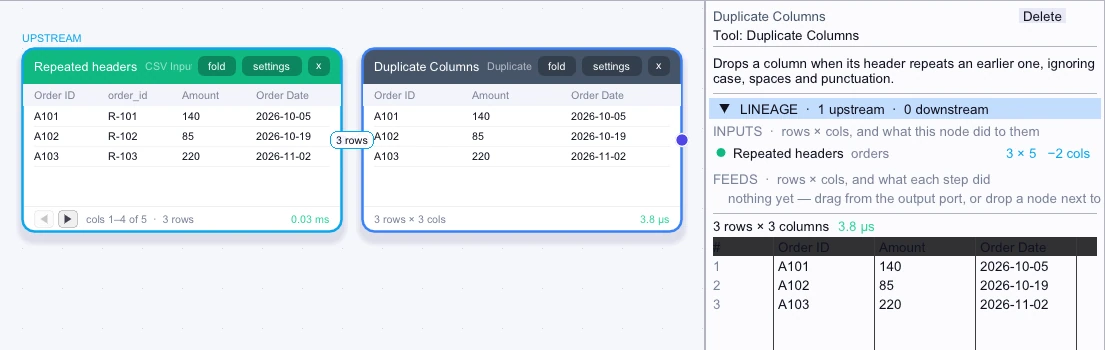
If an import contains Order ID followed by order_id, connect Duplicate Columns. It keeps the first header and drops the later one because both normalize to the same name.
Input
3 rows| Order ID | order_id | Amount | Order Date | ORDER-DATE |
|---|---|---|---|---|
| A101 | R-101 | 140 | 2026-10-05 | 2026-10-06 |
| A102 | R-102 | 85 | 2026-10-19 | 2026-10-20 |
| A103 | R-103 | 220 | 2026-11-02 | 2026-11-03 |
Node output
3 rows| Order ID | Amount | Order Date |
|---|---|---|
| A101 | 140 | 2026-10-05 |
| A102 | 85 | 2026-10-19 |
| A103 | 220 | 2026-11-02 |
Complex workflow
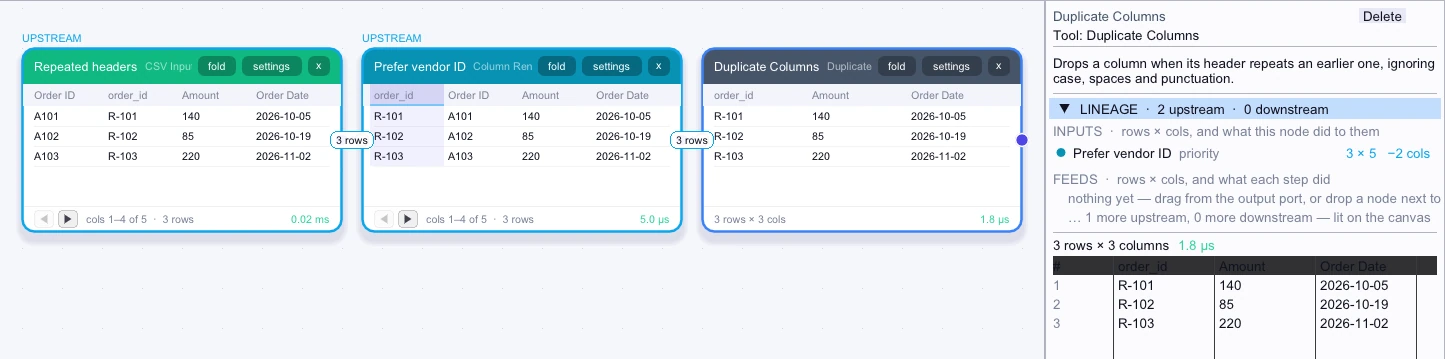
A vendor export repeats several fields under names that differ only in case or punctuation. If a later column is the one you need, move it ahead of its counterpart with Column Renamer. Duplicate Columns then preserves that first occurrence before you pass the table to another step.
Input
3 rows| order_id | Order ID | Amount | Order Date | ORDER-DATE |
|---|---|---|---|---|
| R-101 | A101 | 140 | 2026-10-05 | 2026-10-06 |
| R-102 | A102 | 85 | 2026-10-19 | 2026-10-20 |
| R-103 | A103 | 220 | 2026-11-02 | 2026-11-03 |
Node output
3 rows| order_id | Amount | Order Date |
|---|---|---|
| R-101 | 140 | 2026-10-05 |
| R-102 | 85 | 2026-10-19 |
| R-103 | 220 | 2026-11-02 |