Canvas nodes
Column Renamer
Rename, reorder, or remove columns.
How it works
Change the names and order of fields, and remove columns the next step does not need. Those changes apply to the output table.
Simple example
Connect an orders export and set the new name for order_amt to Amount. The next node receives the same values under the clearer header.
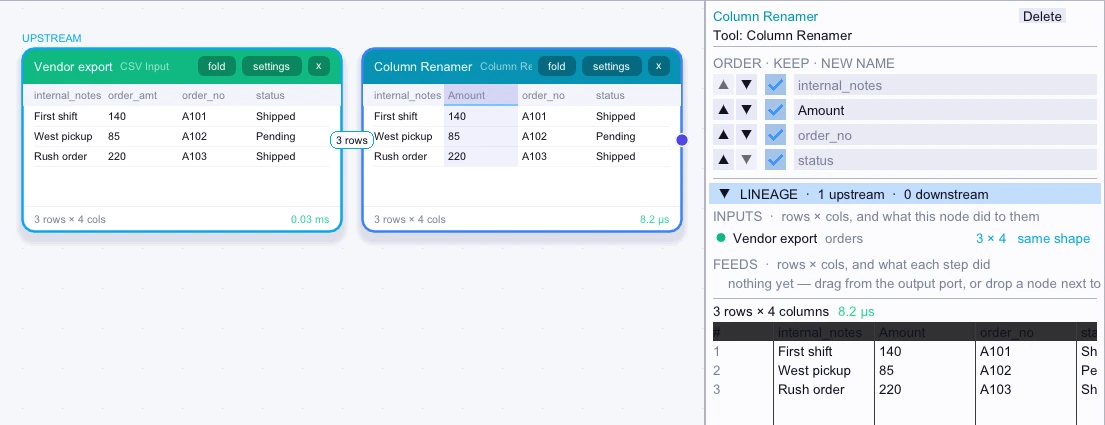
Input
3 rows| internal_notes | order_amt | order_no | status |
|---|---|---|---|
| First shift | 140 | A101 | Shipped |
| West pickup | 85 | A102 | Pending |
| Rush order | 220 | A103 | Shipped |
Node output
3 rows| internal_notes | Amount | order_no | status |
|---|---|---|---|
| First shift | 140 | A101 | Shipped |
| West pickup | 85 | A102 | Pending |
| Rush order | 220 | A103 | Shipped |
Complex workflow
Prepare a delivery file that expects Order ID and Amount first. Rename the incoming headers, use the arrows to move those columns into order, and clear Keep for an internal notes column. Connect CSV Output to export the revised layout.
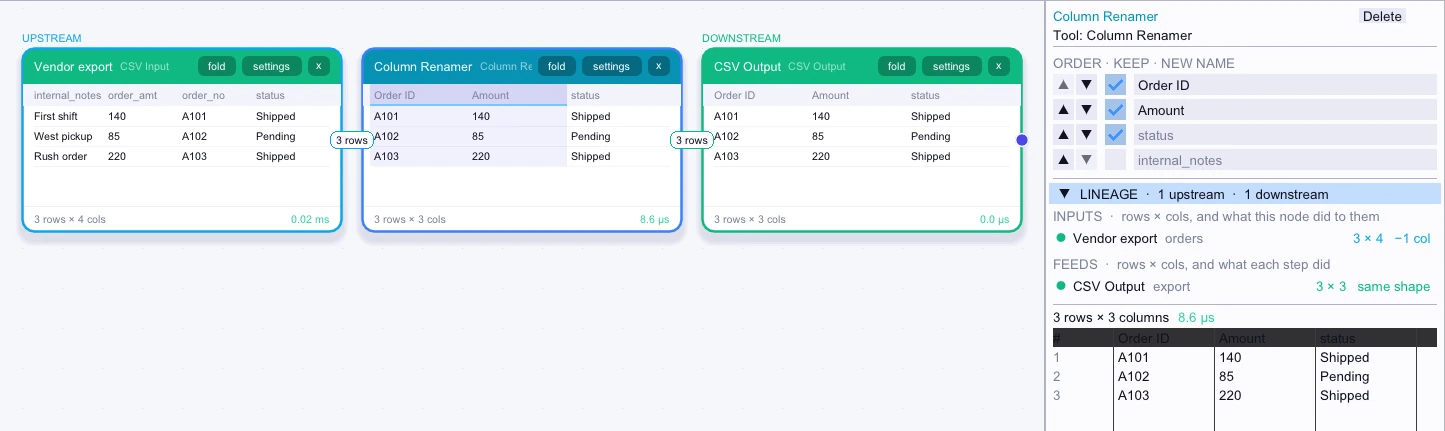
Input
3 rows| internal_notes | order_amt | order_no | status |
|---|---|---|---|
| First shift | 140 | A101 | Shipped |
| West pickup | 85 | A102 | Pending |
| Rush order | 220 | A103 | Shipped |
Node output
3 rows| Order ID | Amount | status |
|---|---|---|
| A101 | 140 | Shipped |
| A102 | 85 | Pending |
| A103 | 220 | Shipped |